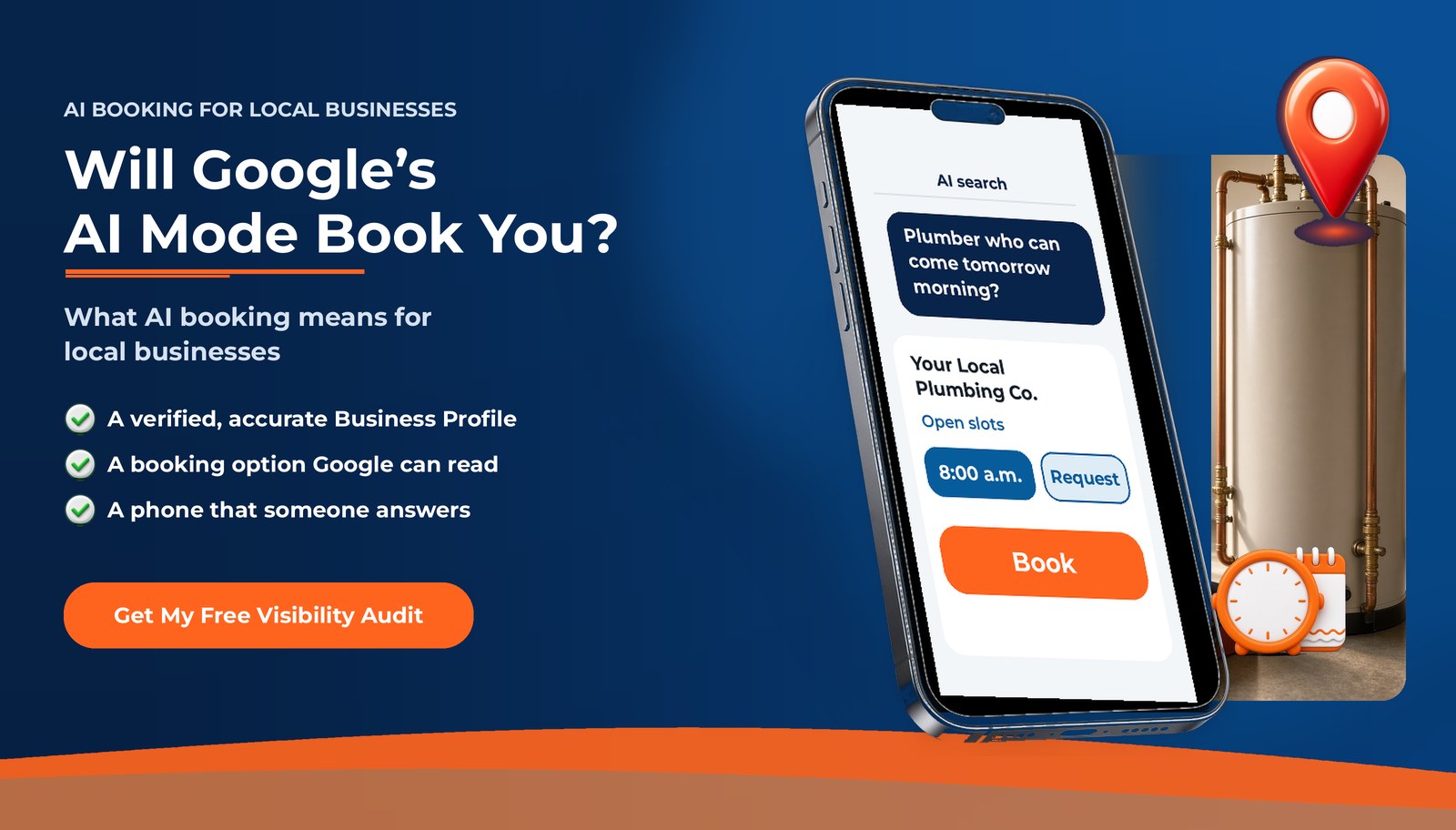
A customer used to search, scroll, and call.
Now some of them type one sentence into Google: "Find me a plumber who can come tomorrow morning." Then Google goes and looks for open time slots for them. In some cases it hands them a booking button. In others, Google phones the business itself.
So the question for every local owner has changed. It's no longer just "Do I show up?" It's "When Google tries to book someone with me, can it?"
Here's what Google has actually launched, where it works, and a checklist so the answer is yes.
The short answer
Can Google's AI Mode book appointments with my business? In the U.S., yes, in more and more categories. Google's AI tools can now look for open slots and send customers to finish booking through partner platforms (like OpenTable for restaurants, Booksy or Vagaro for beauty, and Jobber or Housecall Pro for home services) or through your own booking link. In most U.S. states, Google can also call your business on a customer's behalf. To be bookable, you need a verified, accurate Google Business Profile, a working booking option Google can read, and a phone that someone answers.
What "AI booking" on Google actually means
AI Mode is the chat-style tab in Google Search. You ask a full question and get one answer instead of ten blue links. Google says AI Mode passed one billion monthly users within a year of launch (Google, May 19, 2026). That's Google's own figure.
"Agentic" is the buzzword Google uses. In plain English, it means Google doesn't just answer. It does a task for you. For local businesses, that task is finding an opening and getting the customer booked.
Google's help page for AI Mode lists what customers can ask it to do: find local appointments "such as haircuts or auto repair," research home services "such as electricians, tree cutting, or exterior cleaning," and check dining reservations. It works by gathering information from across the web, completing forms, or calling businesses "when info isn't available online" (Google Search Help).
Notice that last part. If your availability isn't online, Google may pick up the phone and ask you.
What's live, what's still rolling out, and where
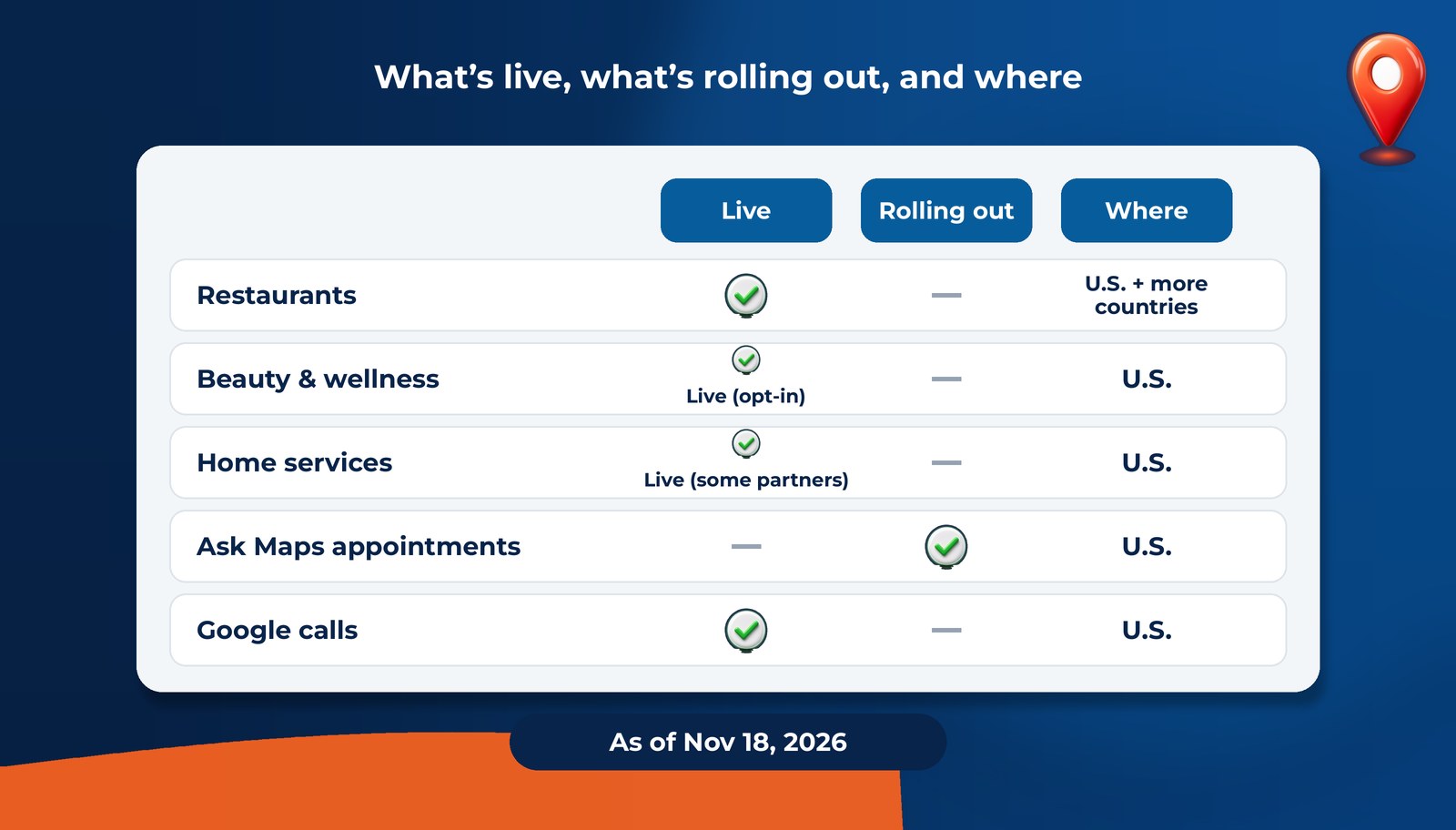
This has been rolling out in steps since August 2025, mostly in the U.S. Here's the status as of Nov 18, 2026, using Google's own posts and help pages wherever possible.
| What | Status | Where | Source |
|---|---|---|---|
| Restaurant reservations in AI Mode | Live for everyone (no opt-in) since Nov 2025. Partners named include OpenTable, Resy, and Tock | U.S. first. Google's help page now lists dining reservations in the U.S., U.K., Canada, Australia, India, New Zealand, Singapore, South Africa, Hong Kong, and a few more | Google, Nov 17, 2025; Google Search Help |
| Beauty and wellness appointments, event tickets | Opened to all U.S. Search Labs users (opt-in) in Nov 2025. Beauty partners named: Booksy, Fresha, Vagaro | U.S. | Google, Nov 17, 2025 |
| Booking for "local experiences and services," plus Google calling businesses for you in "select categories like home repair, beauty or pet care" | Announced May 19, 2026, to "roll out to everyone in the U.S. this summer" | U.S. | Google, May 19, 2026 |
| Home-service booking and quote links in AI Mode | Announced Nov 4, 2026 as "available now in the U.S." Partners: Angi, Thumbtack, Housecall Pro, Jobber, with ServiceTitan "coming soon" | U.S. | Google Search VP Robby Stein on X, as reported by Search Engine Journal; Jobber; Housecall Pro; Angi |
| Ask Maps (the AI chat in Google Maps) finding beauty, pet care, auto, and home-repair appointments and calling businesses for you | Started rolling out Nov 16, 2026 on Android and iOS | "Launching first in the U.S., with more regions coming soon" | Google, Nov 16, 2026 |
| Google's automated calls to book appointments and check prices | Live | U.S., in every state except Indiana, Louisiana, Minnesota, Montana, and Nebraska | Google Business Profile Help |
Two honest notes on that table:
- Not every partner is live yet. Jobber says eligible U.S. customers can appear now. Housecall Pro's Nov 4 announcement says its integration is "coming soon to eligible US customers." ServiceTitan is listed as "coming soon."
- Outside the U.S., it's mostly restaurants for now. Google hasn't announced home-service booking or appointment calling outside the U.S. Ask Maps' appointment finding says "more regions coming soon," with no date.
The three ways Google can book you
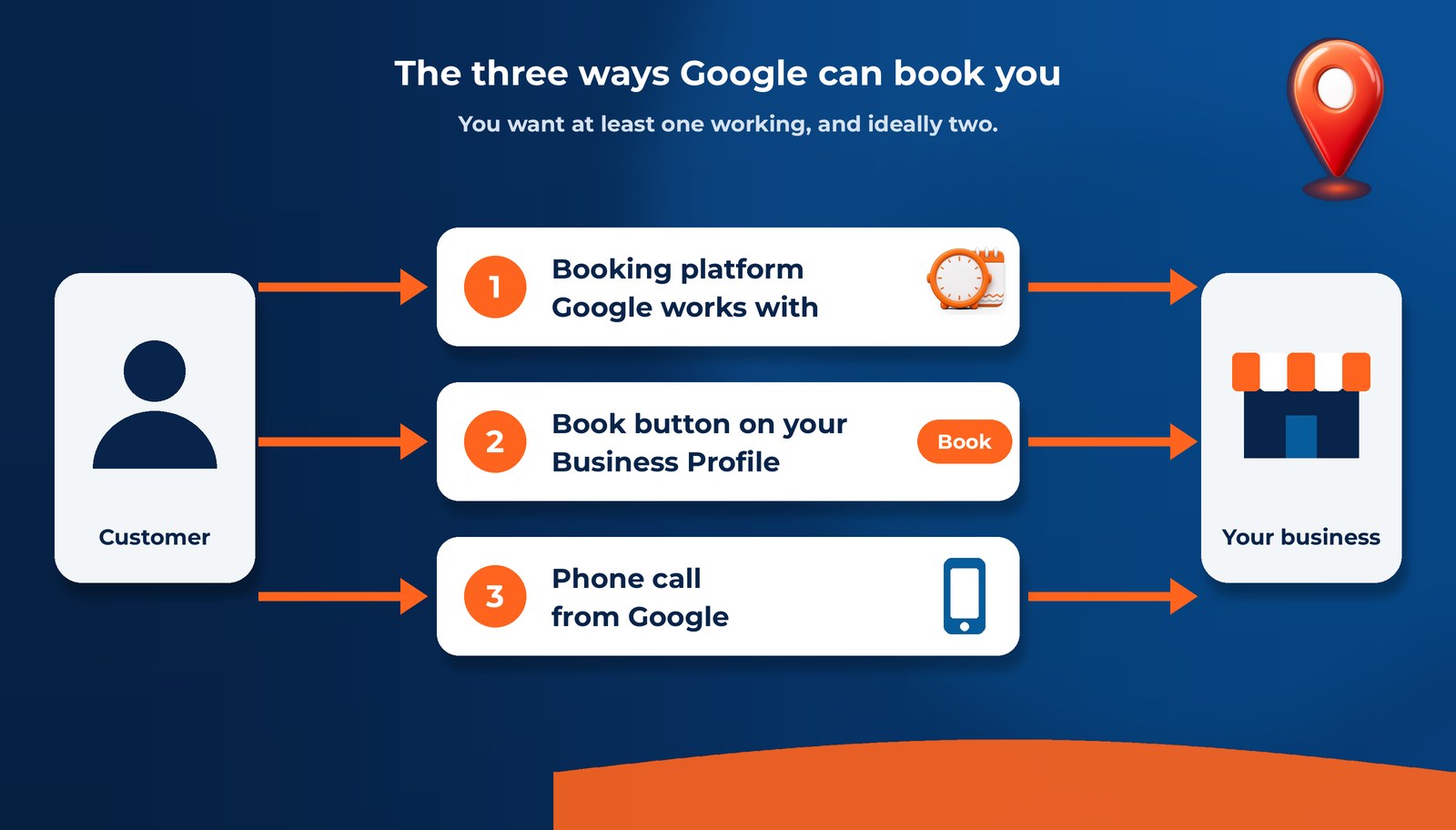
Under the hood, there are three routes. You want at least one working, and ideally two.
1. Through a booking platform Google works with. This is the main route. Google says AI Mode searches "across multiple reservation platforms and websites" for real-time openings, then gives the customer "direct links so you can finalize your booking" through partners (Google, Nov 17, 2025). So if your scheduling software is a Google partner, your calendar is what Google reads.
For home services, that partner is your field service software or marketplace. Jobber, for example, says that when Google matches your Jobber account to your Business Profile, it adds a Book Online button to your profile that links to your Jobber form, "usually within a few days" (Jobber).
2. Through the booking button on your Google Business Profile. Google lets you connect a booking provider through Reserve with Google, or add your own booking link. Providers show up on your profile "within a week" (Google: Set up bookings). You can add up to 10 booking links and mark one as "Business preferred" (Google: Manage your local business links).
3. By phone, with Google doing the calling. Google's Business Profile help page says that after a customer gives details like "preferred time, service type, and party size, Google calls your business to book the appointment." If you use an online booking provider, Google "may book through the partner or by calling your business directly." These calls are recorded, and Google says it avoids calling late at night or early in the morning (Google Business Profile Help).
If none of the three works, a customer who asked Google to book them has nowhere to land with you. They land with someone else.
A worked example: two plumbers, one Tuesday night
A homeowner's water heater starts leaking on a Tuesday night. In AI Mode, they type: "Plumber who can replace a water heater tomorrow morning near me."
Plumber A runs jobs in a field service app that's a Google partner. Their Business Profile is connected and the address matches. A booking form is live with real open slots. Google can show them with a time slot or a request button. The homeowner taps 8:00 a.m. and the request lands in Plumber A's inbox.
Plumber B is just as good. But their profile lists last year's hours, there's no booking link, and the main line goes to a full voicemail. Google has no slots to read, so it may try calling. Nobody picks up.
Same town. Same skill. Different outcome. The work that decides it is mostly boring setup, which is the good news. You can do it this week.
Swap the plumber for a salon, a dog groomer, or an auto shop and the story is the same. Google named home repair, beauty, pet care, and auto as early categories.
Google can only book what it can read. Get a free read on what it sees: Maps + AI.
Get My Free Visibility AuditThe "Can Google book me?" checklist
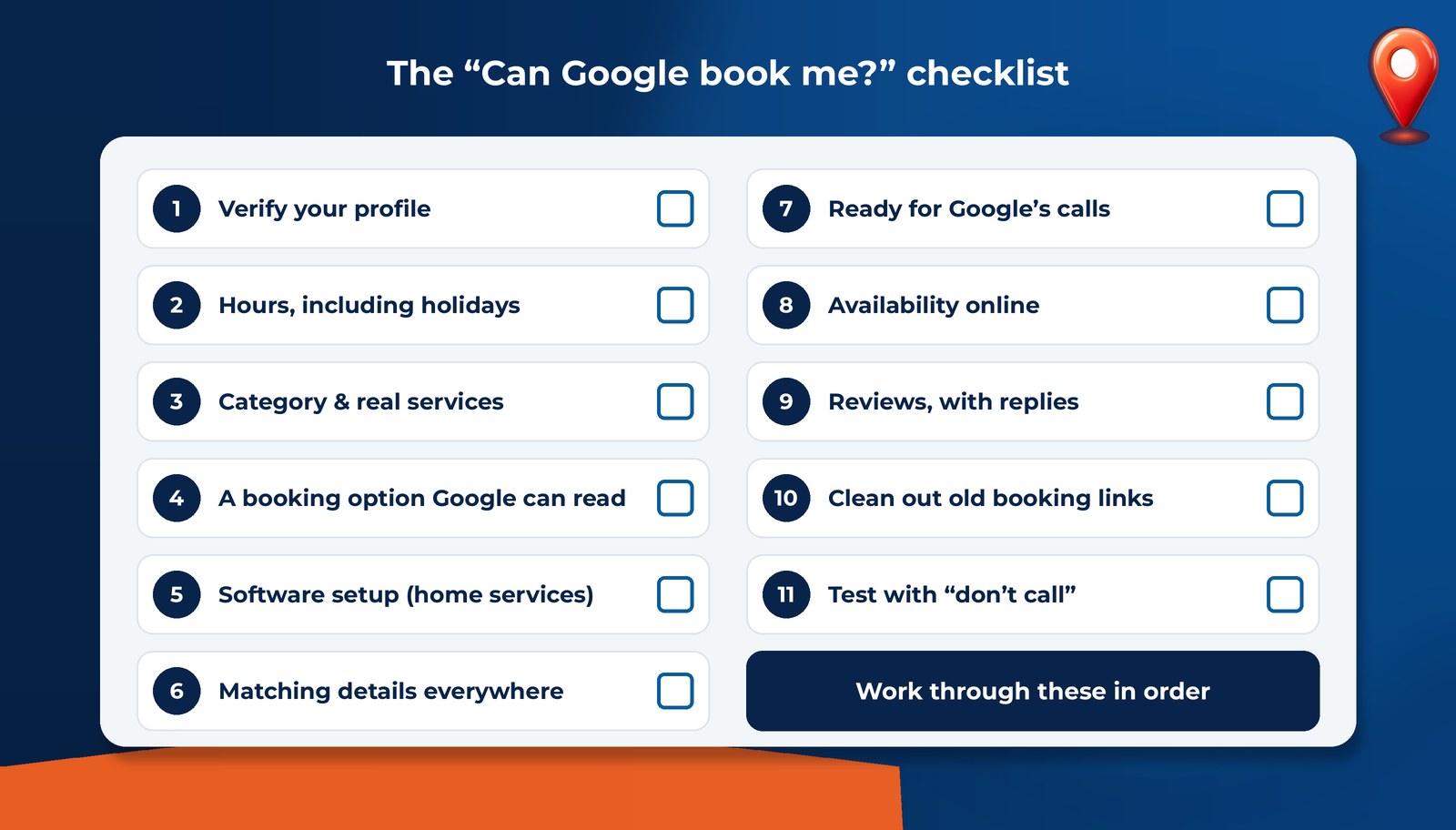
Work through these in order. Every item comes from Google's own help pages or from the booking partners' published requirements.
1. Verify your Google Business Profile. Google says verification "tells Google that you're authorized to represent the business, so it's more likely to show up in search results" (Google: Tips to improve your local ranking). You also need a verified profile to change the automated-call settings in step 7.
2. Make your hours right, including holidays. Google lists "your business hours, including special store hours" as core profile info (same page). An AI that books you off wrong hours is worse than one that skips you. Holiday hours are due now. Our Small Business Saturday checklist walks through them.
3. Pick the right category and list your real services. Google matches you to searches by relevance, which it defines as how well your profile matches what someone is looking for (same page). "Plumber" alone is thinner than a category plus "water heater replacement," "drain cleaning," and so on. Our GBP audit: 12 silent leaks covers categories and services in detail.
4. Turn on a booking option Google can read. Open your profile, select Bookings, and either pick a provider through Reserve with Google or add your own booking link (Google: Set up bookings). If you have several links, set your favorite as Business preferred (Google: local business links). Then tap the button yourself and make sure it opens the actual booking page, not your homepage.
5. Home services: check your software's AI Mode setup. This is where home-service owners win or lose right now.
- Jobber: needs an active paid subscription (trials can't appear), a complete business address, a Business Profile connected at the same address, and a request or booking form connected to Google. Jobber says a booking form, rather than just a request form, plus regular reviews can help AI Mode recommend you more often (Jobber).
- Housecall Pro: says all its users will be eligible at no extra cost and are opted in automatically. You can switch it off under Job Inbox settings (Housecall Pro release; Housecall Pro Help).
- Angi: customers who pick an Angi pro in AI Mode land on that pro's Angi profile to request a quote, so that profile needs to be complete and current (Angi).
- Not on any of these? As of today, Google hasn't named another route for home-service booking links in AI Mode. Your Business Profile booking link (step 4) and your phone (step 7) are still your way in.
6. Make your details match everywhere. Jobber's troubleshooting says that if your business doesn't appear, make sure the address matches Google Maps exactly and your phone number and website are the same as on your Business Profile (Jobber). The same name, address, and phone everywhere is the boring basic we keep coming back to in SEO vs AEO vs GEO.
7. Get ready for Google's calls. If you leave automated calls on, Google may phone to book an appointment or confirm a price. Tell whoever answers your phone that these calls are real, that they come from Google on a customer's behalf, and that they're recorded. You control it in your profile under More → Business Profile settings → Advanced settings → "Google automated calls and text messages," where you can switch "Bookings and inquiries from customers" on or off (Google Business Profile Help). And remember Google's warning: it "will never ask for payment, credit card information, or account passwords" (same page). If a caller does, it isn't Google.
If calls go unanswered today, Google's calls will too. We break down that leak in Why Your Phones Got Quieter Even Though You Still "Rank".
8. Put your availability online if you can. Google's help page says that if a business "does not have its information listed online, such as the earliest available appointment," Google will call to get the answer (Google Search Help). Live online booking means fewer interruptions and faster answers for the customer.
9. Keep reviews coming and reply to them. Google says "more reviews and positive ratings can help your business's local ranking" (Google: local ranking). Jobber says reviews help AI Mode decide which businesses to recommend (Jobber). For what "enough" looks like now, read 4.5 Stars and Reviews From the Last 90 Days. Ask honestly and ask everyone. Next week's post covers the review rules.
10. Clean out old booking links. Booking links can appear on your profile through third-party partners, and you can't delete those yourself. Ask the provider to remove them. Google says providers must act within 5 business days, and you can report them if they don't (Google: local business links). A dead link from a tool you quit two years ago is a booking that never reaches you.
11. Test it like a customer, without bothering anyone. Open AI Mode at google.com/ai and ask for your service in your town. Type "don't call" in your request. Google says that keeps it to online searches only, so it won't phone your competitors or you (Google Search Help). Do you show up? Is there a time slot or a book button? Screenshot it. Then run our 15-minute ChatGPT test to see the AI picture beyond Google.
What Google hasn't said yet
We'd rather tell you what's unknown than guess:
- How Google picks which businesses to show or call. Google's Nov 4 home-services announcement didn't explain it. Search Engine Journal noted the same (SEJ).
- Whether the "everyone in the U.S. this summer" rollout is finished. Google announced it in May. We haven't found a Google post confirming it's complete. Expect some customers to see it and others not to.
- Whether Ask Maps calls follow the same opt-out setting. Google's Nov 16 post doesn't say (SEJ, Nov 16, 2026).
- When home-service booking leaves the U.S. Google hasn't given a date.
None of that changes the checklist. Accurate info, a working booking path, and a phone that gets answered help in every version of this.
FAQs
In the U.S., increasingly yes. AI Mode can find open slots and link customers to finish booking through partner platforms or your own booking link, and in most U.S. states Google can also call your business to book. Restaurants are the furthest along. Beauty, pet care, auto, and home services are rolling out now.
CTA: get the Free Local Visibility Report (homepage)
AI booking rewards the businesses Google can read clearly: right hours, a working book button, matching details, and a phone that gets answered.
Google can only book what it can read. Get a free read on what it sees: Maps + AI.
Prefer to talk it through? Call us at +1-240-330-5465.
Sources
All accessed and re-fetched 2026-11-18. Each was opened live and checked against the claim it supports.
- Google Blog: AI Mode in Search gets new agentic features and expands globally (Robby Stein, Aug 21, 2025). Restaurant reservations first, "expanding soon to local service appointments and event tickets"; partners incl. OpenTable, Resy, Tock, Booksy; U.S. AI Ultra via Labs. (Background for the timeline; not quoted in body.)
https://blog.google/products-and-platforms/products/search/ai-mode-agentic-personalized/ - Google Blog: New ways to plan travel with AI in Search (Julie Farago, Nov 17, 2025). Restaurant booking to all U.S. users with no Labs opt-in; event tickets and local appointments for all U.S. Labs users; partners OpenTable, Resy, Tock, Ticketmaster, StubHub, SeatGeek, Vivid Seats, Booksy, Fresha, Vagaro; "direct links so you can finalize your booking."
https://blog.google/products-and-platforms/products/search/agentic-plans-booking-travel-canvas-ai-mode/ - Google Blog: A new era for AI Search (Elizabeth Reid, May 19, 2026). AI Mode over one billion monthly users; agentic booking expanded to "local experiences and services"; Google calling businesses "for select categories like home repair, beauty or pet care"; "roll out to everyone in the U.S. this summer."
https://blog.google/products-and-platforms/products/search/search-io-2026/ - Google Blog: New Ask Maps features to help with holiday travel and prep (Maz Khorasani, Nov 16, 2026). Ask Maps finds "beauty, pet care, auto and home repair appointments online and call[s] local businesses"; rolling out on Android and iOS; appointments "launching first in the U.S., with more regions coming soon."
https://blog.google/products-and-platforms/products/maps/ask-maps-holiday-travel-features-2026/ - Google Search Help: Use AI Mode to check local availability and pricing. Use cases (haircuts, auto repair, electricians, dining); completing forms or calling businesses when info isn't online; "don't call" option; English, signed-in users over 18; dining-reservation country list.
https://support.google.com/websearch/answer/17104441?co=GENIE.Platform%3DDesktop&hl=en - Google Business Profile Help: About automated calls and texts from Google to your business. Calls to book appointments and confirm prices; may book through partner or by phone; recorded; U.S. except IN, LA, MN, MT, NE; never asks for payment; opt-out via settings.
https://support.google.com/business/answer/7690269?hl=en - Google Business Profile Help: Set up bookings through a provider. Reserve with Google providers; add your own link; providers show "within a week."
https://support.google.com/business/answer/7475773?hl=en - Google Business Profile Help: Manage your local business links. Up to 10 links per category; "Business preferred"; third-party booking links removed via provider within 5 business days.
https://support.google.com/business/answer/6218037?hl=en - Google Business Profile Help: Tips to improve your local ranking on Google. Verify; complete and accurate info incl. special hours; relevance, distance, prominence; "more reviews and positive ratings can help."
https://support.google.com/business/answer/7091?hl=en - Jobber Help Center: Jobber and Google AI Mode integration (updated Nov 4, 2026). U.S., paid subscription, address match, connected GBP, form connected; Book Online button within a few days; booking form + reviews help; troubleshooting on phone/website match. (Partner primary source.)
https://help.getjobber.com/en/articles/jobber-and-google-ai-mode-integration/ - Housecall Pro: Housecall Pro integrates with AI Mode in Google Search (Nov 4, 2026). All users eligible, no extra cost, no lead fees; "coming soon to eligible US customers." Plus Housecall Pro Help: Job Inbox: Integration with Google AI (auto opt-in; disable in Job Inbox settings).
https://www.housecallpro.com/resources/housecall-pro-google-ai-mode-integration/
https://help.housecallpro.com/en/articles/17736477-job-inbox-integration-with-google-ai - Angi Investor Relations: Angi Leads Home Services into AI Search with Google (Nov 4, 2026). Homeowners selecting an Angi pro in AI Mode go to the pro's Angi profile to request a quote.
https://ir.angi.com/news-releases/news-release-details/angi-leads-home-services-ai-search-google - Search Engine Journal: Google Adds Home Service Booking & Quote Links To AI Mode (Matt G. Southern, Nov 4, 2026). Quotes Robby Stein's X post ("available now in the U.S."; ServiceTitan "coming soon"); notes Google didn't say how businesses are picked; Thumbtack hadn't announced details. (Secondary; used for the Stein quote only.)
https://www.searchenginejournal.com/google-ai-mode-home-services-booking-quote-links/595871/ - Search Engine Journal: Google Adds Appointment Finding & Business Calls To Ask Maps (Nov 16, 2026). Notes Google's post doesn't say whether Ask Maps calls follow the GBP call setting. (Secondary.)
https://www.searchenginejournal.com/google-ask-maps-appointments-business-calls/597678/